bbc icecream Catalog Handoff to Sheets with Status
Catalog pages are great for discovering candidate products, while Google Sheets is ideal for organizing and filtering. The real risk isn't copying product names into a sheet—it's losing color, size, style, and evidence source during the copy. When handing off, you should separately record what's confirmed on the page, what still needs agent confirmation, and what shouldn't be used as purchase evidence. ## First, confirm what the catalog page shows On the relevant QC page in fashion-reps, you can
Marcus LindqvistMarcus Lindqvist is the site's Editor in Chief, approving every order sheet and writing most of its shipping-line comparisons. His coverage includes agent fee structures, freight-line selection, customs and duty information, and QC photo checks. He approves the order sheet before checkout, then records checkout-to-warehouse, QC photo turnaround and line-handover times to the hour. He weighs and measures every parcel before opening it, films the unboxing on a fixed tripod, and checks fee and duty calculations against the actual invoice two weeks after arrival.
Editor score 4.2 / 5
Insight
Catalog pages are great for discovering candidate products, while Google Sheets is ideal for organizing and filtering. The real risk isn't copying product names into a sheet—it's losing color, size, style, and evidence source during the copy. When handing off, you should separately record what's confirmed on the page, what still needs agent confirmation, and what shouldn't be used as purchase evidence.
First, confirm what the catalog page shows
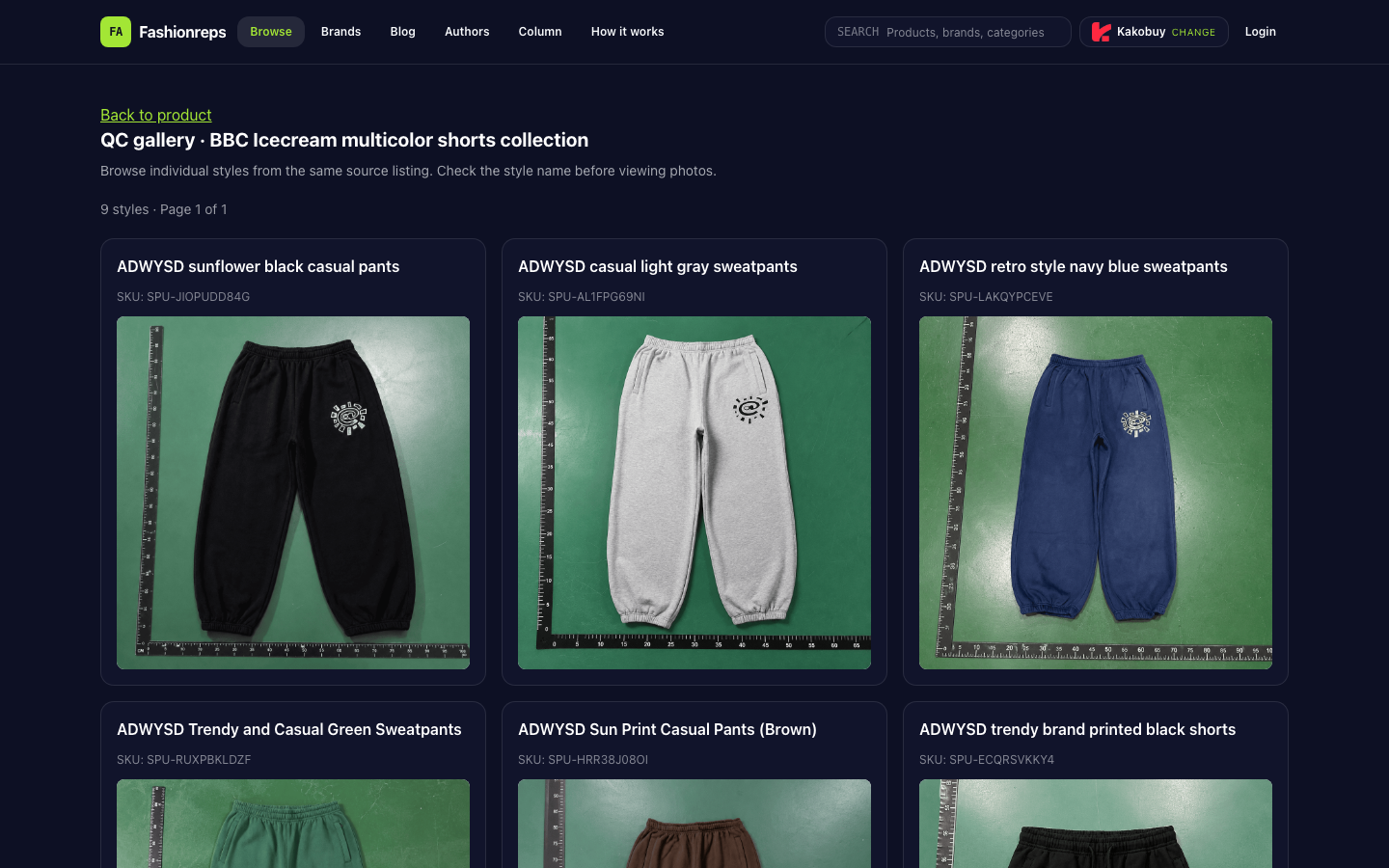
On the relevant QC page in fashion-reps, you can see the page title "BBC Icecream multicolor shorts collection" and it displays 9 styles from the same source list. The page also requires checking style names before entering corresponding photos. Visible entries include product names and SKUs, such as ADWYSD sunflower black casual pants with SKU SPU-JIOPUDD84G; also ADWYSD casual light gray sweatpants, ADWYSD retro style navy blue sweatpants, and ADWYSD trendy brand printed black shorts.
These visible fields can serve as initial evidence for the sheet, but you can't infer price, inventory, shipping, size range, or current availability from them. Product names on the page aren't exactly the same as the page title, so don't write the collection name directly into each product's brand field.

Figure: Field check diagram for catalog-to-sheet handoff. The image is for illustrating information organization, not as evidence of the actual product, QC, or personal testing.
Use minimal fields to preserve handoff context
You don't need to fill all information into the sheet initially. First, create fields that allow tracing back to the page and judging status, then add variant information that requires manual confirmation.
| Field | How to record | Purpose |
|---|---|---|
| Page collection name | Record the visible name as is | Preserve catalog context, avoid mistaking collection name for single product name |
| Product name | Copy the page entry as is | Easy to go back to the original page for verification |
| SKU | Copy the SKU as is | Distinguish similar styles, avoid relying only on titles |
| Color or pattern | Record only what the page explicitly shows | Prevent mistaking color words in names for complete variant information |
| Size | Leave blank and mark as pending confirmation if page doesn't show | Avoid filling in sizes based on assumptions |
| Original page time | Fill in the date and time of viewing | Indicate the time point the evidence corresponds to |
| Evidence location | Record catalog, style card, or QC page | Let later reviewers know where to start |
| Status | Displayed, pending agent confirmation, excluded from candidates | Distinguish facts, to-dos, and filtering conclusions |
Among these, "Color or pattern" and "Product name" should be separated. Color words like black, gray, or brown in product names can be textual evidence from the page, but they don't necessarily represent complete color options; if the page doesn't list other colors, don't expand into multi-color variants on your own.
Order for copying from catalog to Sheets
Step one: Save the page collection name and original page location first. Don't just copy product titles as soon as you open the page, because you'll lose the context that these products belong to the same source list.
Step two: Create records one by one in the actual order on the page. Each record should at least include product name and SKU. For entries without SKU, truncated names, or incomplete page text, keep them as is and mark as pending verification; don't replace them with approximate names from search results.
Step three: Verify style images separately. Style images can help distinguish different entries, but the images themselves don't prove size, fabric, inventory, or price. If you need to use images as review evidence, note the corresponding style card or QC page in the evidence location, not just write "viewed image".
Step four: Then handle color, size, and variants. Fill in colors or patterns explicitly written on the page under "displayed"; leave fields blank if not explicitly shown, and mark as pending agent confirmation in the status column. Don't infer complete variants from image colors, common sizes, or product titles.
Step five: Record the original page time. Catalog content may change, and the time field helps the team determine which viewing a record corresponds to. It's not a guarantee of inventory or price, just a time boundary for the evidence.
Step six: Only then proceed to filtering. You can filter by status to show "displayed" candidates, or separately view "pending agent confirmation" records. Don't delete uncertain rows during copying, otherwise later you won't be able to tell if they were absent or appeared but had insufficient evidence.
Separate the three statuses
Displayed means the page directly provided the corresponding information, such as visible product name or SKU. It only supports those fields, not automatically price, inventory, shipping, or purchase availability.
Pending agent confirmation means the catalog page doesn't provide enough information, or it needs confirmation in the subsequent purchase process. For example, specific sizes, available colors, current orderability should remain pending until corresponding evidence is obtained.
Excluded from candidates means this record doesn't meet current filtering criteria, or evidence is insufficient to support further decisions. Instead of deleting, keep the reason, like "page doesn't show required size" or "cannot confirm corresponding style", so the team doesn't re-check the same issue.
What the catalog page and Google Sheets each handle
The catalog page is better for browsing by brand or collection, viewing product cards, opening style images, and returning to original links. It preserves visual context but isn't suitable as a long-term team filtering sheet.
Google Sheets is better for putting name, SKU, variants, evidence location, and status in the same row, and then using filters, sorting, and collaborative comments for subsequent tasks. Its value lies in organizing obtained information, not replacing the catalog page or automatically proving product information.
During handoff, keep original page fields and treat Sheets as a working copy. Any content that needs re-confirmation should be traceable back to the corresponding page or evidence location from the sheet. That way, later filtering won't lose color, size, and source context just because only a product title remains.
Checks before completing handoff
- Does each candidate have page collection name, product name, and SKU, or clearly marked reason for missing?
- Are color, pattern, and size recorded separately, without writing image observations as page facts?
- Have you saved the viewing date and evidence location?
- Is pending agent confirmation content not filled in as certain values?
- Have you kept reasons for exclusion instead of deleting records?
- Have you avoided mistaking catalog visible information for price, inventory, shipping, or purchase guarantees?
After these checks, Google Sheets becomes a reviewable catalog handoff sheet, not just a temporary list of product titles.