Gap Variant Mismatch: What to Check Before Paying
[] When you see mismatched colors, sizes, or images on a Gap product page on fashionreps, don't proceed to payment right away. First confirm exactly which variant you intend to buy, then decide whether you need to ask the external shopping agent for clarification. The catalog page only helps you locate the product; it cannot replace verifying the
Marcus LindqvistMarcus Lindqvist is the site's Editor in Chief, approving every order sheet and writing most of its shipping-line comparisons. His coverage includes agent fee structures, freight-line selection, customs and duty information, and QC photo checks. He approves the order sheet before checkout, then records checkout-to-warehouse, QC photo turnaround and line-handover times to the hour. He weighs and measures every parcel before opening it, films the unboxing on a fixed tripod, and checks fee and duty calculations against the actual invoice two weeks after arrival.
Editor score 4.2 / 5
Insight
[ ]
When you see mismatched colors, sizes, or images on a Gap product page on fashionreps, don't proceed to payment right away. First confirm exactly which variant you intend to buy, then decide whether you need to ask the external shopping agent for clarification. The catalog page only helps you locate the product; it cannot replace verifying the order options and actual QC images.
Record the Product Identity First
After opening the Gap category page, save the following information and note the time of your inquiry:
- Full product title
- Product category or page position
- Color description displayed on the page
- Visible size range
- Main product image or QC entry point
- The product page URL you plan to use
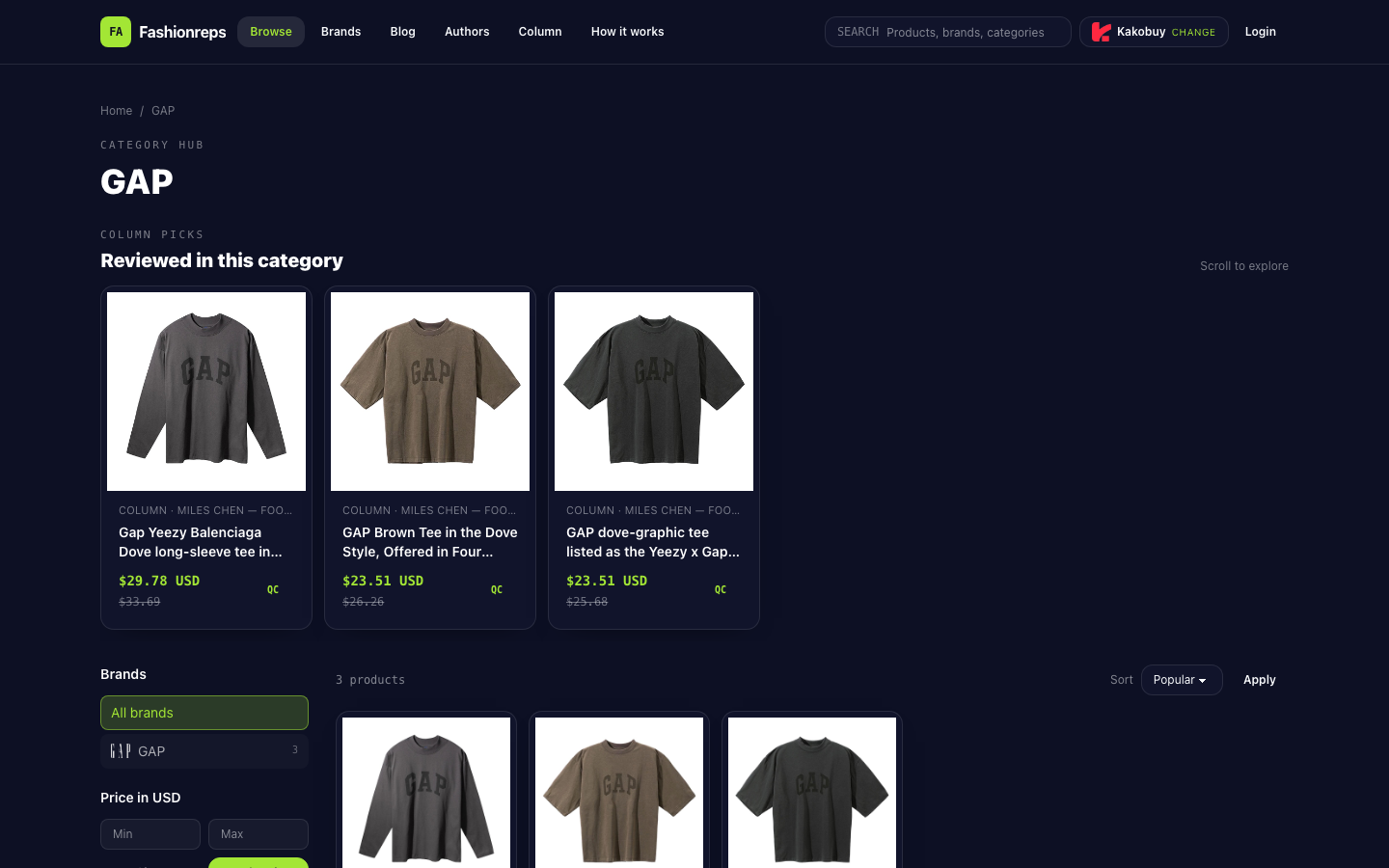
The page currently lists 3 Gap products: a charcoal gray relaxed-fit long-sleeve Dove T-shirt, a brown Dove-style T-shirt available in four washed colors, and a Yeezy x Gap boxy cut Dove graphic T-shirt in sizes S–XL. The catalog also shows reference prices, but these should not be taken as your final payment amount.
Verify Variants in Page Order
Don't just rely on the product title. Go through the catalog card, product details, and order options in sequence, focusing on whether the same product remains consistent throughout.
| Verification Field | What to Confirm | Action When Conflict Occurs |
|---|---|---|
| Product Identity | Whether the title, image theme, and product link refer to the same item | Reopen the detail page and confirm you didn't enter from a different catalog card |
| Color | Whether the color description in the catalog matches the detail page and order options | Pause payment and save screenshots of both pages |
| Size | Whether the sizes listed on the detail page appear in the order options | Don't infer available sizes from the size range in the title |
| Images | Whether the main image, detail images, and visible QC images show the same style | If they don't match, record the image differences and ask the agent |
| QC Entry | Whether the QC entry clearly belongs to the current product | If the entry is ambiguous, don't use images from other products as evidence |
Color Mismatch
If the catalog says charcoal gray but the detail page or order options show another color, don't judge solely by image similarity. Grays, browns, and different washes may be hard to distinguish in thumbnails; rely on the explicit text and corresponding options.
If the color names on two pages are completely different, first save screenshots of the catalog card, detail page, and options area, then pause payment. Don't choose the closest option on your own unless the agent clearly explains the correspondence between color names.
Size Mismatch
Some products on the page are labeled S–XL, but that only means the catalog information shows that range. It doesn't prove that all Gap products offer the same sizes, nor that a particular size is currently orderable. Check the actual sizes listed on the detail page and whether you can select the same size when ordering.
If the catalog has a size range but the detail page lacks corresponding options, or if the order options differ from the detail page, treat the conflict as unresolved and don't fill in information using another product's size chart.
Image Mismatch
When images don't match, first distinguish between differences in angle, color display, and actual style. Check that the print position, garment color, sleeve length, fit, and visible decorations are consistent. If the catalog image shows a long-sleeve version but the detail page image can't confirm sleeve length, don't assume it's the same product.
The QC entry on the page can only serve as a follow-up clue if it clearly belongs to the current product. Images without a corresponding product identifier are not sufficient evidence that your chosen color or size has been checked.
Pre-Payment Steps
- Close or pause the payment page to avoid placing an order before the variant is confirmed.
- Go back to the Gap category page and re-record the product title and catalog image.
- Re-enter the detail page from that catalog card and confirm the link didn't jump to another product.
- Compare the detail page's color, size, images, and visible QC entry.
- Save screenshots of the conflicting areas and write down the exact text shown.
- Use the purchase agent entry provided on the page to ask about the specific correspondence.
- Only after the agent explicitly confirms the product, color, and size, re-check the payment information.
fashionreps page notes that the buy button leads to a selected external shopping agent; orders, payments, and shipping are handled by the agent's website. Therefore, the platform catalog cannot confirm the final variant shown on the agent's end, nor replace the agent's response regarding order options.
When to Stop
Do not continue to payment if any of the following occurs:
- The same link shows different colors on different pages with no clear mapping explanation;
- The catalog, detail page, and order options cannot be matched to the same product;
- The size range appears only in the title and cannot be found in the actual options;
- The images show a style, sleeve length, or print that clearly contradicts the product title;
- QC images are not clearly stated to belong to the current product;
- The agent cannot confirm your chosen color and size;
- You can only rely on guessing to complete the option selection.
Such page conflicts do not mean fashionreps has been proven to malfunction. They only mean that the current visible evidence is insufficient to lock down the exact variant. If you cannot obtain clearer correspondence, keeping screenshots and stopping payment is a safer approach than ordering based on similar images.