Stone Island Jacket Guide: Filter & Record Sizes
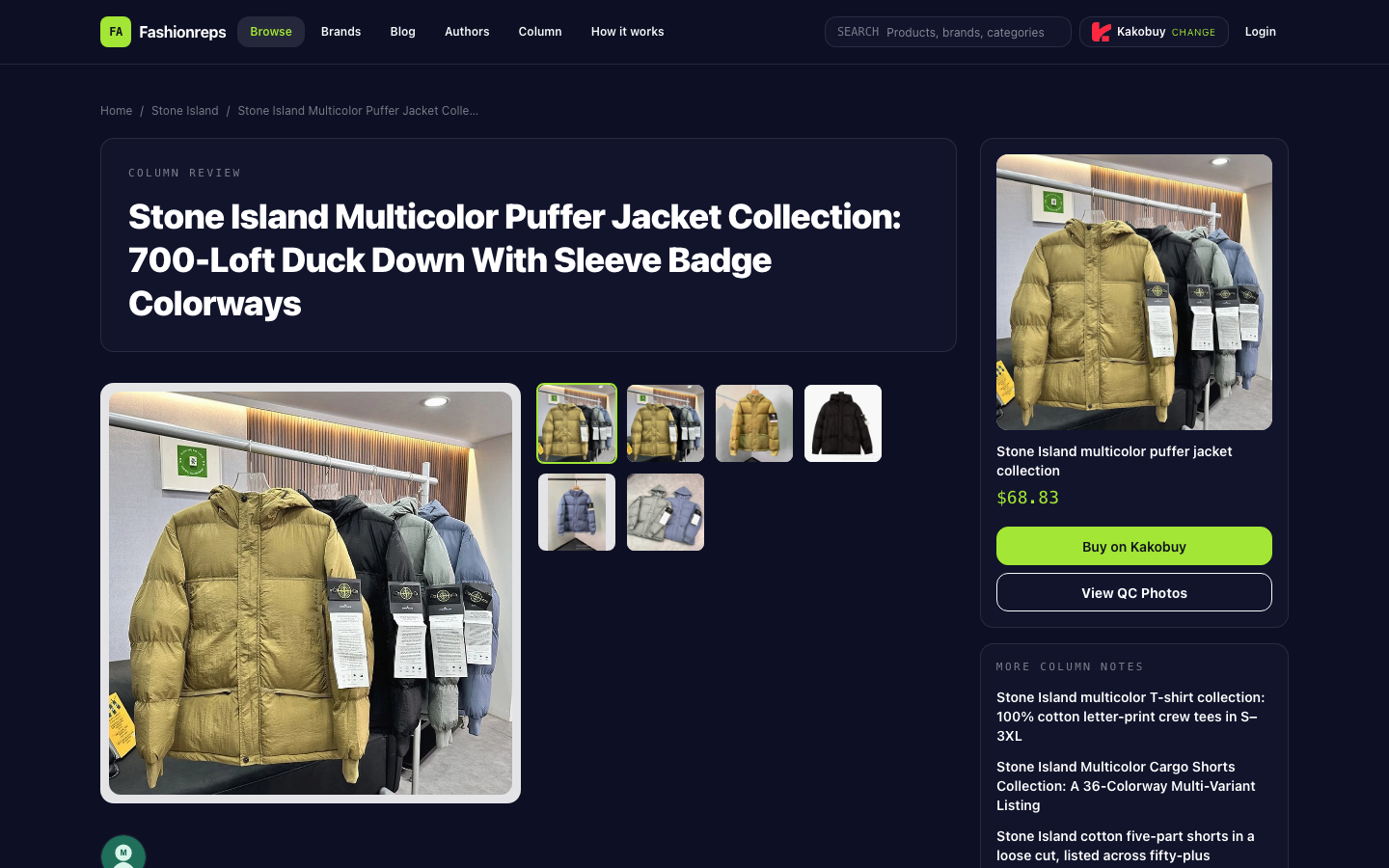
First, define your filtering goals If your goal is to narrow down the fashionreps Stone Island fall/winter jacket catalog to a few candidates worth further verification, the key is not to decide which one looks best first, but to confirm whether each candidate has a clear product page, complete size information, traceable image links, and specific issues to clarify. The verifiable example page is the Stone Island Multicolor Puffer Jacket Collecti
Marcus LindqvistMarcus Lindqvist is the site's Editor in Chief, approving every order sheet and writing most of its shipping-line comparisons. His coverage includes agent fee structures, freight-line selection, customs and duty information, and QC photo checks. He approves the order sheet before checkout, then records checkout-to-warehouse, QC photo turnaround and line-handover times to the hour. He weighs and measures every parcel before opening it, films the unboxing on a fixed tripod, and checks fee and duty calculations against the actual invoice two weeks after arrival.
Editor score 4.2 / 5
Insight
First, define your filtering goals
If your goal is to narrow down the fashionreps Stone Island fall/winter jacket catalog to a few candidates worth further verification, the key is not to decide which one looks best first, but to confirm whether each candidate has a clear product page, complete size information, traceable image links, and specific issues to clarify.
The verifiable example page is the Stone Island Multicolor Puffer Jacket Collection. The page describes it as a hooded, loose-fit down jacket, listing sizes M, L, XL, XXL, and four badge colorways: ginger yellow, black, royal blue, and navy. It also provides links to view QC photos by style, but this information is still catalog or reference material and cannot replace confirmation of specific measurements and actual condition.

Step 1: Confirm on the website whether the candidates correspond to the same product page
Start from the brand or catalog section on fashionreps to access the product page; don't save candidates based solely on search result titles. For each candidate, at least check the following:
- Does the product title match the page after opening it?
- Is the brand indeed listed as Stone Island?
- Does the page specify the style, color, or badge colorway?
- Does the page list available sizes?
- Do the page images correspond to the current product, rather than related items or recommendations?
- Is there a QC photo link for that style?
- Does the product page URL open normally without redirecting to an unrelated page?
The example page describes this jacket as loose fit, listing four badge colorways and sizes from M to XXL. It can be kept as a candidate with relatively complete specification information, but that doesn't mean it fits your body, because the page doesn't provide the flat measurements you need: chest width, shoulder width, and length.
Step 2: Break down page evidence into reviewable fields
The website is good for browsing original context, viewing product images, and accessing QC links; Google Sheets is better for comparing multiple candidates side by side. So the spreadsheet should not copy the entire product description, but only save fields that affect purchase decisions.
| Field | What to record from the website | Judgment when recording |
|---|---|---|
| Product title | Full title shown on the page | To confirm you open the same page later |
| Product link status | Opens normally, redirects abnormally, or broken | Broken links cannot be recommended for purchase |
| Style and color | Visible info such as hood, badge colorway | Don't add colors without page evidence |
| Size range | Sizes explicitly listed on the page | Record only sizes actually listed |
| Image links | Product images, style images, or QC links | Distinguish catalog images from specific QC images |
| Flat chest width | Mark as to be confirmed if not provided | Request from the agent for the specific style |
| Shoulder width and length | Mark as to be confirmed if not provided | Don't derive measurements from height/weight |
| Exclusion reason | Broken link, incomplete sizes, insufficient evidence | Keep reasons to avoid rechecking same candidate |
For the example page, known info can be recorded as "loose fit, sizes M to XXL, four badge colorways, QC photo links by style." Flat chest width, shoulder width, and length should be left blank or marked "to be confirmed" rather than filled with typical size assumptions.
Step 3: Record size evidence separately; don't treat suggestions as actual measurements
The page's sizing advice suggests Stone Island jackets typically require sizing up one size, giving an example that someone who usually wears M might consider L; it also states this jacket is loose fit. These two pieces of information cannot simply be combined into "everyone must size up."
A more reliable recording method is to use three layers:
- Size advice from the page or public discussions: record as reference notes.
- Fit description on the current product page: record as loose fit.
- Flat measurements for specific sizes: confirm chest width, shoulder width, and length with the agent before deciding.
For actual filtering, you can use a jacket you already own and that fits well as a reference. Measure its chest width, shoulder width, and length, then compare with the flat measurements the agent provides for the current product. Without flat measurements, the candidate can only move to "further verification," not "ready to order."
Step 4: Distinguish catalog specs, buyer feedback, and personal judgment
The page lists white duck down, 200–250g fill weight, 700 fill power, 80–85% down content, and claims of windproof, down-proof, and low-temperature suitability. These are catalog specifications. They can be recorded as fields but cannot be written as independently verified performance conclusions.
Similarly, the page quotes a Stone Island down jacket buyer feedback mentioning good sleeve badge quality and that the jacket feels thin. Since this feedback is not explicitly for this specific jacket on the current page, it can only serve as general reference, not as actual QC or wear proof for this candidate.
In Google Sheets, you can clearly label evidence types:
- "Catalog specs": parameters directly listed on the page.
- "Buyer feedback": experience mentioned in public reviews, but need to confirm if it applies to the current product.
- "To confirm with agent": not provided on current page, must ask.
- "Editor judgment": conclusion to keep, hold, or exclude based on recorded evidence.
The benefit is that when you later see a QC photo or receive flat measurements, you know which type of evidence it supplements, rather than mixing sources into one conclusion.
Step 5: Use Google Sheets for filtering and review queue
After initial recording, you can set up simple filters in Google Sheets:
- Only view candidates with link status "opens normally."
- Only view candidates whose size range includes the size you might choose.
- Only view candidates with product images or QC links.
- Only view candidates whose chest width, shoulder width, and length are still to be confirmed, to focus questions to the agent.
- Hide excluded items, keeping exclusion reasons for future reference.
The website product page and the spreadsheet serve different purposes. The website provides product context, image browsing, and page links; the spreadsheet puts multiple candidates in one view for field filtering, notes, and collaborative review. The "purchasable" status in the spreadsheet should still be reconfirmed on the product page and agent's page, not inferred from a complete record alone, as stock, shipping, and final price may vary.
If multiple people are checking, it's recommended that only one person modifies candidate status, while others add evidence or questions, to avoid duplicate saving or inquiries for the same product. Always note the reason for status changes, e.g., "flat measurements added," "page broken," "QC link doesn't match current colorway," rather than just changing "to be confirmed" to "approved."
Final review process that works on both mobile and desktop
Mobile is good for quickly opening pages, checking titles, colors, sizes, and image links; desktop is better for viewing the product page and Google Sheets side by side and organizing multiple candidates. Regardless of device, follow the same review order:
- Open the product page, confirm title, brand, and link match.
- Record colors, style, and sizes explicitly listed on the page.
- Open product images or QC links to confirm images belong to the current candidate.
- Record page specs separately from buyer feedback.
- List chest width, shoulder width, and length as to be confirmed; don't fill with assumptions.
- Use actual measurements of a jacket you own as comparison baseline.
- After receiving supplemental data from the agent, decide to keep, hold, or exclude.
- Before ordering, recheck page status, available sizes, cost, and international shipping.
With this method, the Stone Island multicolor down jacket in the example can be saved as a candidate with "relatively complete page fields but still needing size verification." It should not be written as a recommendation for everyone without specific flat measurements and confirmation of current purchase status.