Trapstar Hoodie QC: Verify Evidence Before Buying
When you see a Trapstar hoodie on fashionreps but can't find the QC photo entry, don't rush to order, pay, or request shipment. First confirm whether the entry is simply not displayed, the gallery is temporarily empty, or the current link isn't properly bound to a specific style. After troubleshooting, you should be able to decide to continue verifying, wait for more photos, or hold off on
Marcus LindqvistMarcus Lindqvist is the site's Editor in Chief, approving every order sheet and writing most of its shipping-line comparisons. His coverage includes agent fee structures, freight-line selection, customs and duty information, and QC photo checks. He approves the order sheet before checkout, then records checkout-to-warehouse, QC photo turnaround and line-handover times to the hour. He weighs and measures every parcel before opening it, films the unboxing on a fixed tripod, and checks fee and duty calculations against the actual invoice two weeks after arrival.
Editor score 4.2 / 5
Insight
When you see a Trapstar hoodie on fashionreps but can't find the QC photo entry, don't rush to order, pay, or request shipment. First confirm whether the entry is simply not displayed, the gallery is temporarily empty, or the current link isn't properly bound to a specific style. After troubleshooting, you should be able to decide to continue verifying, wait for more photos, or hold off on buying. 🧭
Define the troubleshooting task for missing QC photo entry on trapstar hoodies
This article addresses only one issue: the product page seems viewable, but you cannot confirm whether there is a QC photo entry for that specific Trapstar hoodie.
fashionreps pages are mainly for discovering products, viewing source information, and entering the shopping agent process. Orders, payments, warehousing, and shipping are usually handled by an external shopping agent you choose. Therefore, a QC entry on the page cannot replace the actual inspection photos provided by the agent's warehouse, nor can it prove that the item has been truly inspected.
After troubleshooting, you should get one of three outcomes:
- The page has a clear QC entry, and it points to the current style.
- The page shows an entry, but the gallery is empty, won't load, or can't be confirmed to match the style.
- The page has no usable entry, and you should pause the purchase until additional evidence is available.
If you have already entered payment, submitted an order, or asked the agent to ship, keep the order and product records. Do not create duplicate orders or pay again just because the entry is missing. ⚠️

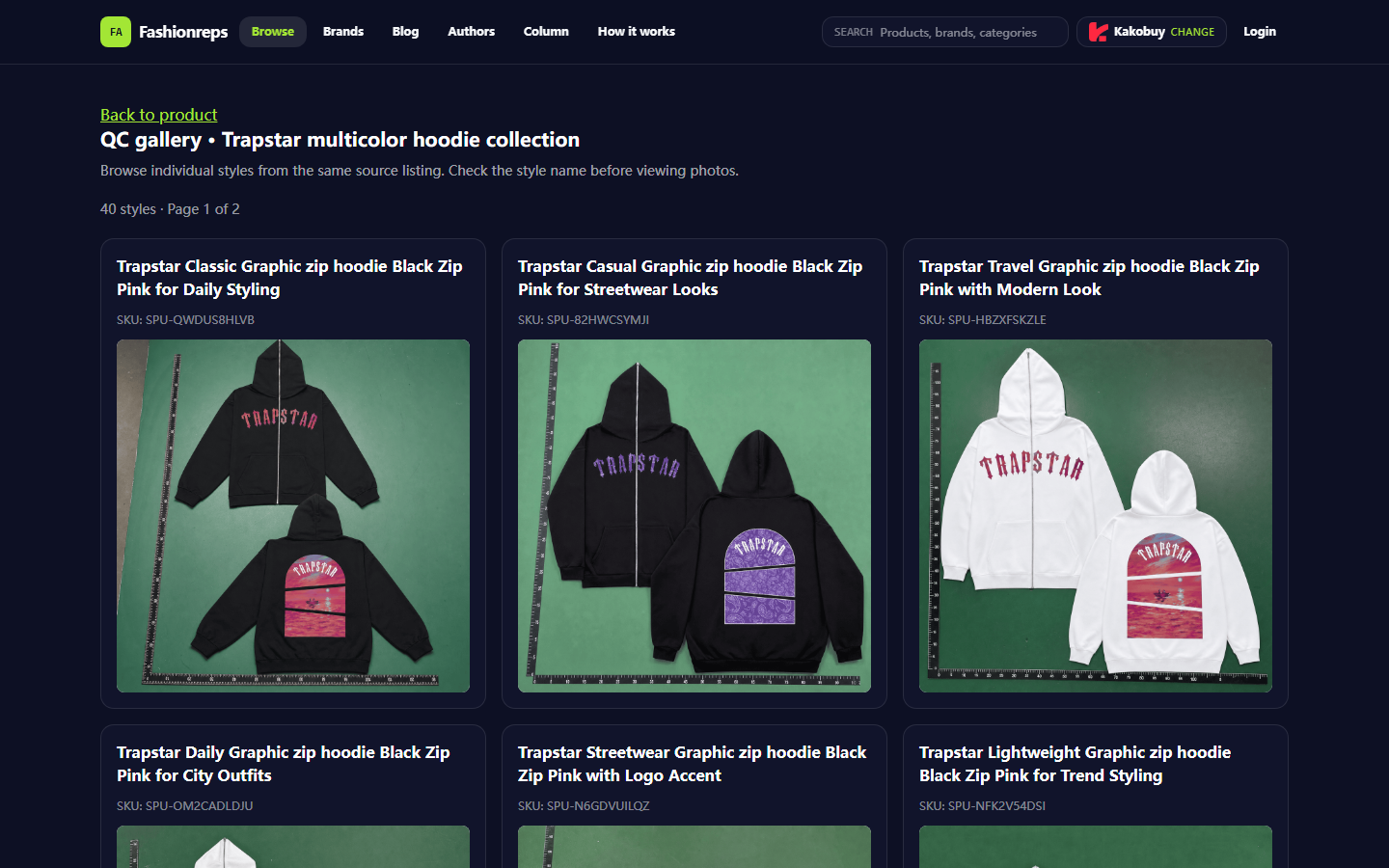
Caption: The screenshot shows the QC gallery, individual style list, and SKU information for the Trapstar multicolor hoodie collection. The screenshot is only intended to illustrate the page verification path and does not imply that any specific item has completed warehouse inspection.
Save product page title, color, size, and current link status
Before refreshing the page or contacting support, save the current product information. Do not just note the generic name "Trapstar hoodie," because the same source list may contain multiple graphics, colors, and styles.
Recommended to record the following:
- The full title shown on the product page.
- Color or colorway name.
- Selected size; if not selected, record as "not selected."
- Current product page URL and access time.
- SKU, style name, or other product identifier displayed on the page.
- The QC entry text you see, such as "View QC Photos" or similar button.
- The page address after clicking, loading result, and screenshot file name.
When taking screenshots, blur names, addresses, phone numbers, order numbers, payment information, and full shipping labels. Product name, color, size, SKU, entry text, and error messages should remain visible; otherwise, customer service cannot determine which style the issue relates to. 🔒
If the page only shows a collection page, do not treat the collection title as the specific style you are buying. The screenshot shows a page with multiple Trapstar graphic hoodie designs, each with different style names and SKUs; therefore, subsequent verification must be based on the specific style or SKU.
Look for the View QC Photos entry on the product detail page and record page behavior
Start with the product detail page, not directly relying on search results, browser history, or old screenshots.
Follow these steps:
- Open the product detail page and confirm the page title matches the saved title.
- Select or confirm color and size, but do not submit an order.
- Look for QC-related entries near the product images, product information, or purchase button.
- Record the entry text, its location, and whether it is clickable.
- Click and wait for the page to finish loading, then record the final content.
- Return to the product detail page and confirm you are still on the same style, not back to a collection page or another item.
If the entry says "View QC Photos," after clicking focus on three things: whether photos appear, whether they include the current SKU or style information, and whether the page still retains the color and size association.
Do not assume photos are valid just because the button exists. An entry might lead to a collection gallery, a generic info page, or an unfinished page. Truly useful evidence must tie the photos to the current product style.
Re-enter the product page to check if the entry is bound to this item
After the first click, close the old tab or open a new clean tab and reopen the saved product URL. This step helps rule out misjudgments caused by browser cache, old sessions, or incorrect redirects.
Recheck:
- Is the product title the same?
- Are the color and size options still present?
- Is the SKU or style identifier the same?
- Does the QC entry still appear?
- Does clicking lead to the same QC page?
- Does the style name on the QC page match the product page?
If the collection page contains multiple similar styles, don't treat any Trapstar image in the gallery as QC evidence for the current item. You need at least a correspondence via style name, SKU, color, or another stable identifier.
If different entries repeatedly redirect to the collection page, or your selection resets when you return, record the status as "cannot confirm binding," not "QC photos available." 📌
Distinguish visible situations: entry not shown, empty gallery, or link issues
Different symptoms require different next steps. Use the table below to organize evidence:
| Visible situation | What can be confirmed | What cannot be confirmed yet | Recommended action |
|---|---|---|---|
| No QC entry on product page | Current page does not show a usable entry | Cannot confirm if photos exist in the backend | Save page screenshot, ask customer service or agent if QC photos are available for this SKU |
| Entry exists but gallery is empty | Page has an entry, but no photos currently visible | Cannot confirm if photos are temporarily missing or loading failed | Record time, page status, and SKU; pause purchase until a clear answer |
| Entry leads to collection page | Page can access related gallery or collection | Cannot confirm photos belong to current style | Return to product page and recheck style name, color, and SKU |
| Entry returns error or blank page | Current link cannot display valid content | Cannot confirm if the item has QC records | Save error message and final URL; do not repeatedly pay or create orders |
| Photos exist but no style identifier | Page shows images | Cannot confirm images match current item | Mark evidence as insufficient; request photos with SKU or style correspondence |
These judgments only describe what you see on the page and do not indicate a system failure on fashionreps or the external agent. If there is only one loading failure, record the time and browser environment, then do one low-frequency, reproducible revisit. Do not refresh continuously or click in bulk, as that may cause duplicate requests or confuse evidence.
Organize screenshots, page times, and information to confirm with customer service
When contacting customer service or the shopping agent, be specific about the product and style. Do not just ask "Where are the QC photos?" and do not share full order details, ID documents, payment cards, or shipping labels.
Prepare the following information:
- Full product title.
- Color, size, and SKU.
- Current product page URL.
- QC entry text or "entry not displayed."
- Final page address after clicking or error symptom.
- Screenshot time and time zone.
- The question you want to confirm: whether there are warehouse QC photos for this SKU, whether new photos are needed, and whether they match the current color and size.
If customer service replies with just "There are QC photos" or "You can buy," that is not enough to prove the photos are tied to the current style. Keep asking for the specific SKU, photo status, and expected time for any new photos. If they ask for sensitive information, first see if you can use part of an order number or redacted screenshots instead.
Set clear conditions for requesting new photos, waiting for confirmation, and stopping purchase
Until you get evidence that matches the current style, set the item status to "purchase paused." This is not a judgment on product quality but risk control for insufficient evidence.
Conditions to continue waiting or request new photos:
- Customer service clearly confirms QC photos are available for this SKU.
- Time and method for providing new photos are clear.
- Photos cover key inspection points, such as overall appearance, graphics, size label, stitching, obvious defects, and packaging condition.
- Color and size match the options you plan to buy.
Conditions to stop proceeding:
- The page never shows an entry, and customer service cannot confirm photos for this SKU.
- Provided photos cannot be matched to a specific style, color, or size.
- SKUs on the product page, collection page, and customer service replies contradict each other.
- The entry repeatedly redirects, the gallery remains empty, and there is no clear repair or new photo arrangement.
- The agent demands immediate payment or shipping without verifiable QC evidence.
When pausing, just keep the product link, screenshots, times, and customer service records. Do not place duplicate orders to "reserve stock." If an order already exists, first confirm order status and the rules for cancellation, refund, or waiting for new photos before taking further action. 🛑
Use a checklist to complete the decision: continue verification or pause
Before deciding, check each item:
- [] Product title saved, and not just the collection page title.
- [] Color, size, and SKU recorded.
- [] Current product URL can be reopened, or the issue state is recorded.
- [] QC entry text, position, and click result screenshot taken.
- [] QC photos can be clearly matched to the current style.
- [] Page time, browser behavior, and error message recorded.
- [] Customer service question is specific to SKU, color, size, and photo status.
- [] No order, payment, identity, or full shipping information exposed.
- [] No duplicate payment, duplicate order, or shipment request due to missing entry.
If all key items are confirmed, proceed to the external shopping agent's purchase and warehouse inspection process. Even if QC photos are visible, you should still verify actual item photos, size, color, obvious defects, and packaging at the warehouse stage. If key evidence is missing, pausing the purchase is usually safer than continuing to pay without confirmation. ✅
Article image
